CLPS DAW: A Pocket 8-Bit DAW Built on the Plain Web Audio API
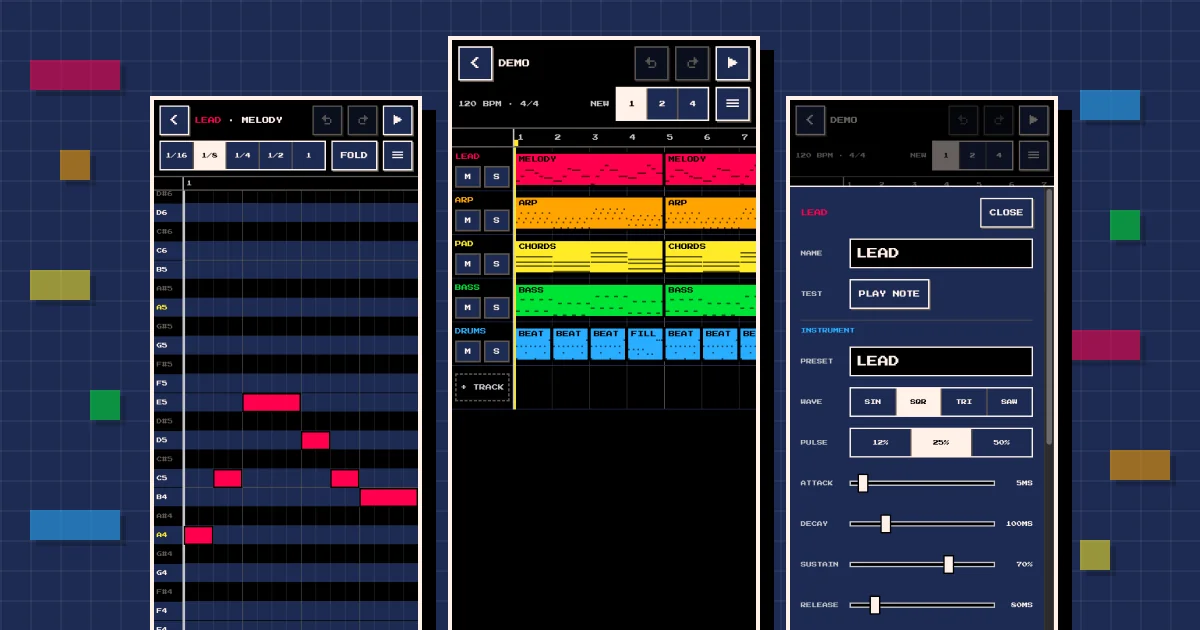
I wanted to compose songs on my phone. Not record them: write them note by note, with square waves and a noise channel, the way old consoles made music. So I built CLPS DAW, a pocket 8-bit DAW that runs in the browser, installs as an app on iOS, Android and desktop, and makes every sound with the plain Web Audio API. The code is on GitHub under the MIT license.
This post opens a new category for my side projects. I have written about one before (Lalo, the private AI assistant I built for my family), and from now on they get their own section, each told in three parts: the need, the problems, and what came out the other end. In this one, the surprise was where the effort went. The code was the fast part. Deciding what to build and working around iOS Safari took the real attention.
The need: a song sketchbook that fits in a pocket
My brief was one paragraph long. A DAW for composing songs as a hobby, on my phone. A React single-page app with no server rendering, everything in the client. JSON import and export, WAV export. A minimalist 8-bit interface, basic oscillator instruments and a track view.
Two constraints shaped everything else:
- No audio libraries. Browsers already ship oscillators, gain nodes, filters, a convolver for reverb and an offline renderer. When the planning session offered Tone.js to save code, I turned it down: I wanted to see how far the Web Audio API goes on its own.
- No backend. Songs live on the device, a JSON file is the backup and the way to move them around, and hosting is a static site on GitHub Pages.
Thirty decisions before the first line of code
I did not start with code. I started with /grill-me, a planning skill that comes from Matt Pocock’s skills repo: the agent interviews you in rounds, and every question comes with options and a recommended answer. It asked 30 questions in six rounds. Piano roll or tracker? Linked or independent copies of a pattern? How many tracks, where songs are stored, which palette, what PLAY does on each screen. I answered with letters (“1: a, 2: a, 3: c…”), and the whole interview took about 30 minutes.
Meanwhile, a subagent researched how iOS Safari treats Web Audio and Home Screen apps. It spent about 12 minutes and 72 tool calls on WebKit bugs, MDN and WebKit’s own source code, and its findings changed the design before anything was built.
I accepted most of the recommendations and overrode three:
- Portrait instead of landscape, even though landscape fits more steps on screen.
- Time running left to right, like a classic DAW, instead of downwards like a tracker.
- Real effects: a filter, a tempo-synced delay and a send to one shared reverb on every track, instead of stopping at volume and pan.
The first two together had a cost. With one bar across a portrait screen, each 1/16 step is about 22 points wide, half the 44 points Apple recommends for anything you tap. That pushed gestures to the front of the design: one finger edits, two fingers pan, and a pinch zooms the time axis.
Every answer went into docs/DESIGN.md: 31 numbered decisions, the JSON song format, the audio graph, the gestures and each iOS quirk with its source. Every later session started from that file instead of from my memory. I wrote last year that AI is good at producing variants and our job is to pick one. This interview was that idea in its purest form.
Phase by phase, with the phone as the judge
The build order came out of the same interview. Each phase ended on a milestone I could check on a real device, and the next phase waited until I had checked it. Every push to main ran typecheck, lint, format check and tests in GitHub Actions, then deployed to GitHub Pages.
To be clear about who did what: Claude Code wrote the code and the tests, and checked each phase in a desktop browser before deploying. I made the decisions, tested the milestones on my phone and reported what felt wrong.
| Phase | Scope | Milestone | Claude’s estimate | Actual |
|---|---|---|---|---|
| 1 | Skeleton, PWA, deploy, data model | Open the URL and install it | 30–90 min | 12 min |
| 2 | Audio engine | A test pattern plays with the phone on silent | 60–90 min | 9 min |
| 3 | Piano roll | Compose a pattern | 90–120 min | 11 min |
| 4 | Track view, linked clips, storage, undo | Compose a song that survives closing the app | 90–120 min | 15 min |
| 5 | Instruments, mixer, effects, JSON and WAV | Save the WAV to Files | 90–120 min | 8 min |
| 6 | Android and desktop | Install it and export a WAV on Android and desktop | 2–3 h | 3 min |
“Actual” runs from my go-ahead to the pushed commit, taken from the session timestamps (phase 4 skips the night in between). Claude’s estimates were calibrated for a human developer; its real pace was about ten minutes per phase. Adding up one evening and two mornings, the whole project took about two hours and twenty minutes from my first message to the last commit, including the interview and my own testing. Most of my messages between phases were some version of “all green, continue.”
Where iOS pushed back
Almost every real problem in this project came from one place: iOS Safari, and especially web apps added to the Home Screen. None of them shows up in a desktop browser.
Silent mode mutes Web Audio
By default, iOS plays Web Audio in an “ambient” session, so silent mode mutes it. A music app that goes quiet whenever the phone is on silent is broken. The fix is one line, available since iOS 17 according to a WebKit engineer in bug 237322: set the Audio Session type to playback before creating or resuming the context. The side effect is that it pauses music playing in other apps, which is fair for a DAW. This is the engine’s unlock():
unlock(): void {
  const session = (navigator as AudioSessionNavigator).audioSession
  if (session && session.type !== 'playback') session.type = 'playback'

  if (!this.ctx || this.ctx.state === 'closed') this.create()
  const ctx = this.ctx!
  if (ctx.state !== 'running') void ctx.resume().finally(() => this.publish())

  const silence = ctx.createBufferSource()
  silence.buffer = ctx.createBuffer(1, 1, ctx.sampleRate)
  silence.connect(ctx.destination)
  silence.start()
  this.publish()
}
Where you call it matters too. The HTML spec only counts pointerdown as user activation for a mouse; for touch, activation arrives with pointerup. Unlocking audio in the pointerdown of a piano key does nothing on a phone, so CLPS DAW unlocks on pointerup and on button clicks, and checks the context state again on the next tap after a call or a locked screen interrupts it.
Saving a file takes two taps
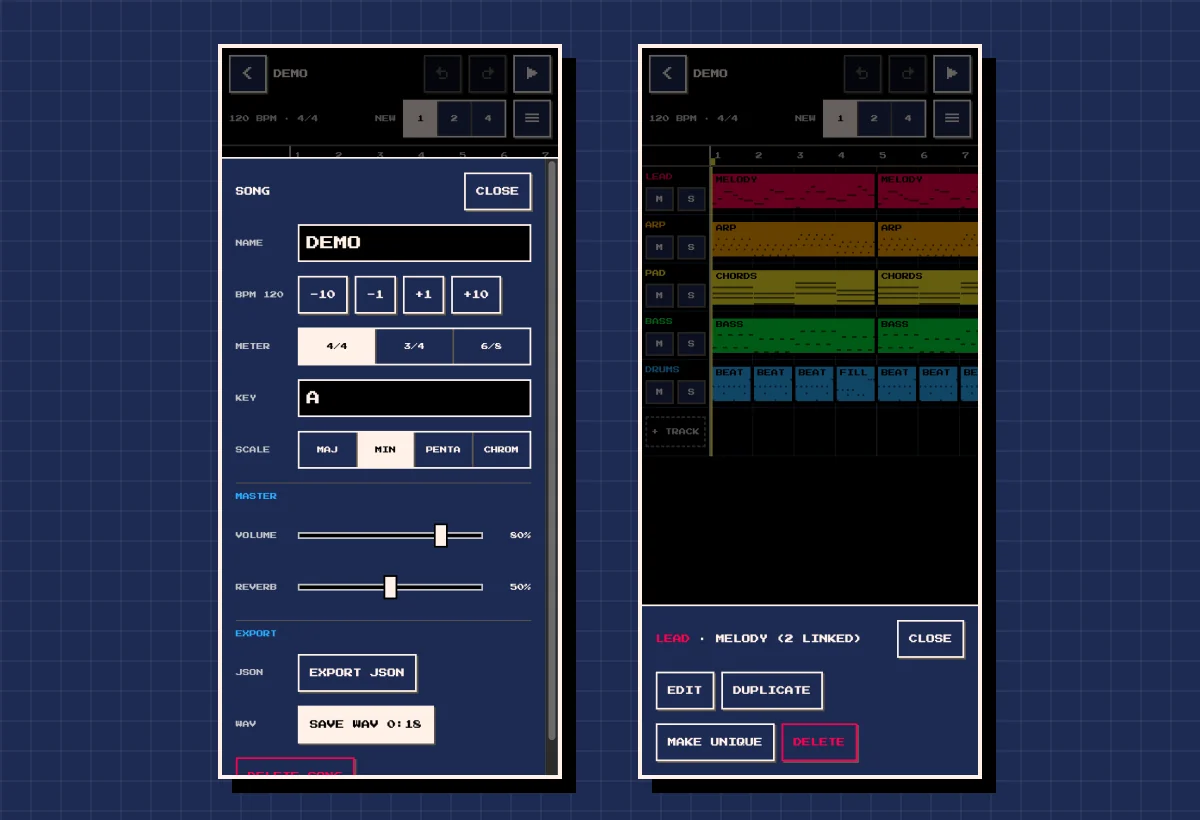
In a Home Screen app, a plain <a download> link is unreliable, so files leave through the share sheet: navigator.share({ files: [file] }), then Save to Files. The catch is that share() needs transient activation, so it has to run right after a tap, and rendering a long song can take longer than that window lasts. Export is therefore two taps: RENDER WAV renders the song with an OfflineAudioContext, and SAVE WAV opens the share sheet. While building it, Claude caught a subtle bug: if you edited the song after rendering, SAVE WAV would have saved the old version. Now any edit hides the button until the next render. Browsers without file sharing fall back to a normal download.
Storage that Safari and the Home Screen do not share
Safari can delete script-writable storage after seven days without interaction, but Home Screen web apps are exempt from that cap. The same page explains the catch: their data is kept apart from Safari’s. A song saved in a Safari tab never shows up in the installed app, and the other way around. CLPS DAW autosaves every song to IndexedDB, asks for persistent storage on launch, and treats JSON export and import as the bridge between the two.
One more limit from the same family: iOS supports neither the manifest’s orientation field nor screen.orientation.lock(). A phone held sideways gets a ROTATE TO PORTRAIT overlay instead of a forced rotation.
The ghost finger
The only real bug that reached my phone showed up after phase 4. I created a pattern, long-pressed it, chose DUPLICATE, and the track view went strange: two-finger scrolling jumped around, long press stopped working, and a single finger zoomed.
The three symptoms pointed to one cause. Both grids keep track of the fingers on screen to tell a one-finger edit from a two-finger pan. The most likely story is that iOS never sent pointerup for the finger that was down when the long-press menu opened under it, so the grid kept tracking a finger that no longer existed. From then on, every real finger counted as two, and two fingers mean pan and pinch.
The fix has two layers. The track view now forgets that finger the moment the menu opens. As a safety net, both grids drop every tracked finger when a touch starts with no other finger down, which is exactly what isPrimary tells you:
if (event.isPrimary) {
  pointers.current.clear()
  gesture.current = { kind: 'idle' }
  if (draftRef.current) setDraft(null)
}
Thirteen minutes after my report, the fix was deployed and working on my phone. The cause is still a hypothesis: it fits all three symptoms, but the bug does not reproduce in a desktop browser, which is why the safety net exists. It is also the best argument for testing on a real device. Claude had flagged the two-finger gestures in the track view as untested (I had cut that browser test short), and emulated touches would most likely not have caught a missing iOS event anyway.
What CLPS DAW does today
The plan was iPhone-only until the last day. Because every iOS workaround was feature-detected, opening it to everyone was a small phase 6: an INSTALL APP button for Chromium’s beforeinstallprompt event, a wider layout for big screens, right-click on clips and keyboard shortcuts. Today, CLPS DAW is a small but complete studio:
- A piano roll on a 1/16 grid from C1 to C8, with the song’s scale highlighted and a FOLD button that hides the notes outside it.
- Patterns placed as clips on up to 8 tracks. Copies stay linked by default, so fixing one chorus fixes them all, and MAKE UNIQUE detaches a copy for variations.
- Sine, square, triangle and sawtooth oscillators, square waves with 12.5%, 25% or 50% pulse width, presets and an ADSR editor.
- Drums synthesized from noise and pitch sweeps: kick, snare, closed and open hi-hat, and tom.
- Volume, pan, mute, solo, filter and delay per track, plus one shared reverb.
- 100 steps of undo, autosave, JSON import and export, and WAV export at 44.1 kHz, 16-bit stereo.
- Mouse wheel, right-click and keyboard shortcuts when you use it on a computer.
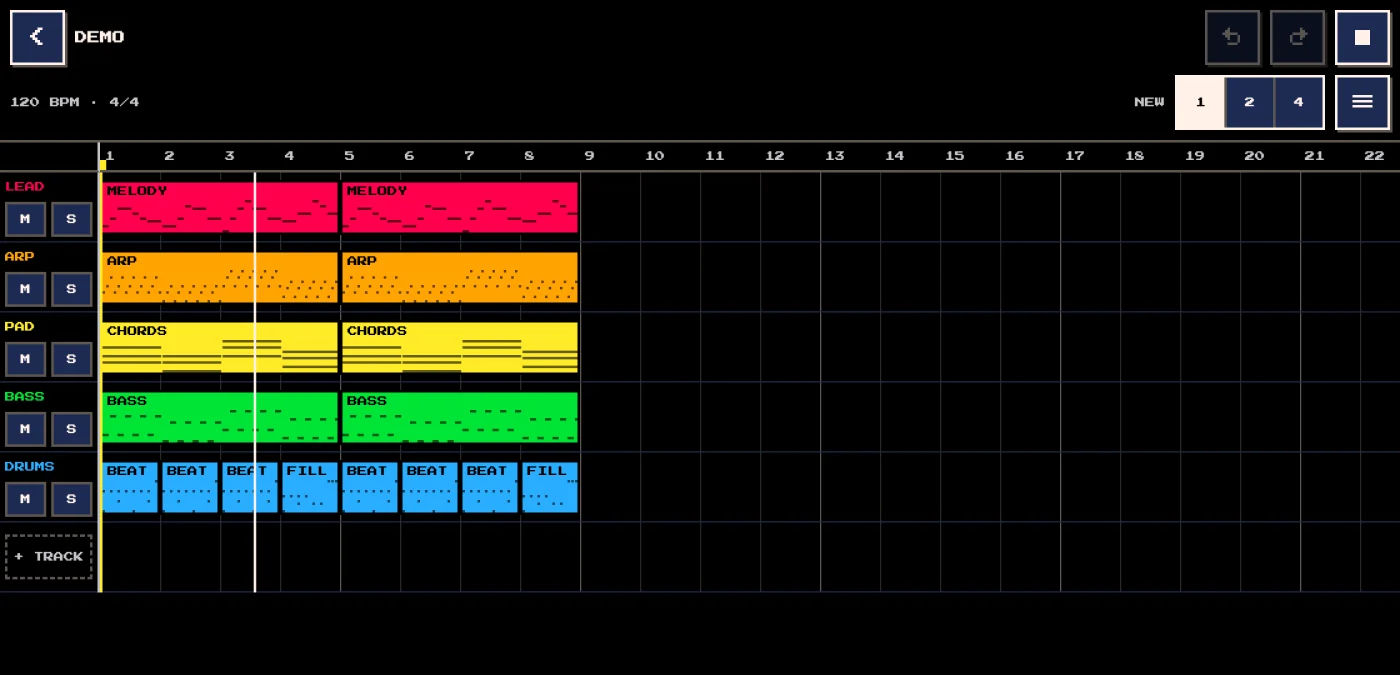
Under the hood it is React 19, TypeScript, Zustand, Zod and idb-keyval, with no audio library. The song model is plain data and pure functions with no React or Web Audio inside, so 101 Vitest tests cover it in Node. The audio engine is a singleton outside React, and one graph builder serves both the live AudioContext and the offline one that renders the WAV. The scheduler is the classic lookahead pattern from Chris Wilson’s “A tale of two clocks”: a 25 ms timer schedules every note that starts in the next 120 ms on the audio clock, so the tempo holds even while React is busy repainting. The look is the 16-color PICO-8 palette with the Press Start 2P font, and the deployed JavaScript weighs under 120 KB gzipped, React and Zod included.
The 8-bit sound lives in small details like the noise. All the drums share one buffer generated by a 15-bit linear-feedback shift register, the same trick as the NES noise channel:
export function lfsrNoise(length: number): Float32Array<ArrayBuffer> {
  const samples = new Float32Array(length)
  let register = 1
  for (let i = 0; i < length; i++) {
    const feedback = (register ^ (register >> 1)) & 1
    register = (register >> 1) | (feedback << 14)
    samples[i] = register & 1 ? 1 : -1
  }
  return samples
}
What I’m taking from it
- Decide before you build. Thirty minutes of questions settled things that would otherwise have surfaced halfway through the code, one rewrite at a time.
- Write the decisions down.
DESIGN.mdmade three separate sessions behave like one project. - Test on the device people actually hold. Every real problem was specific to iOS and invisible in a desktop browser.
- Feature-detect the workarounds. They cost nothing elsewhere, and they made going cross-platform almost free.
- The code was not the bottleneck. My time went into choices and checks, and that is where it should go.
FAQs
Q: Is CLPS DAW free, and does it work offline?
Yes to both. It is open source under the MIT license, and once installed as a PWA it opens without a connection. Songs live in your browser’s IndexedDB, so export a JSON copy of anything you care about.
Q: Does it work on Android and on a computer?
Yes. In Chrome or Edge, on Android or desktop, the songs screen shows an INSTALL APP button. On an iPhone, open it in Safari and use Share, then Add to Home Screen. Firefox on desktop cannot install web apps, but CLPS DAW runs in a regular tab.
Q: Can I import MIDI or audio files?
Not yet. Version 1 imports its own JSON format only. Audio import, MIDI import and export, live recording from an on-screen keyboard, multi-note selection and automation are on the v2 list in the design document.
Which side project have you been putting off because you assumed the code would be the hard part?